Best Laptop Stand for Remote Work in 2026
The OMOTON Portable Laptop Stand at $12.99 is the best budget laptop stand for remote work in 2026. Adjustable height, foldable design, and compatibility with 10 to 17 inch laptops.
Best Laptop Stand for Remote Work in 2026
I started working from home in early 2020 and within three months my neck began aching every afternoon. I blamed it on stress and long hours. It took a chiropractor visit to tell me the real cause was my laptop screen sitting six inches below eye level all day. My head was tilted forward like a turtle, putting constant strain on the cervical spine.
The fix was not expensive. I bought a basic laptop stand and started positioning my screen at eye level. The neck pain disappeared within two weeks. I wish I had done that months earlier instead of trying stretching exercises and massage therapy that only gave temporary relief.
If you work remotely from a laptop, a stand is one of the highest-return adjustments you can make. It costs less than a single hour of physical therapy and provides lasting ergonomic benefit. This guide covers the best laptop stands for remote work in 2026, with real prices and availability checked on Amazon.
Why Laptop Stands Matter for Remote Workers
Laptops are designed for portability, not ergonomics. The screen and keyboard are fixed together at a 13-inch or 15-inch diagonal. When you place a laptop on a desk, the screen sits at about 6 to 8 inches below eye level for most adults. To see the screen, you tilt your head forward. That forward head posture multiplies the weight of your head on your neck muscles.
Research from the Journal of Orthopaedic & Sports Physical Therapy shows that leaning your head forward just 15 degrees increases the effective weight on your neck from 10 pounds to 27 pounds. At 30 degrees of lean, it jumps to 40 pounds. Most laptop users sit somewhere between 20 and 30 degrees of forward head posture during a workday. Over eight hours, that cumulative strain causes headaches, shoulder tension, and chronic neck pain.
A laptop stand solves this by raising the screen to eye level. Once the screen is at the right height, your head sits neutral, your shoulders relax, and your spine aligns properly. You may still feel some adjustment period as your body adapts, but the improvement is usually noticeable within days.
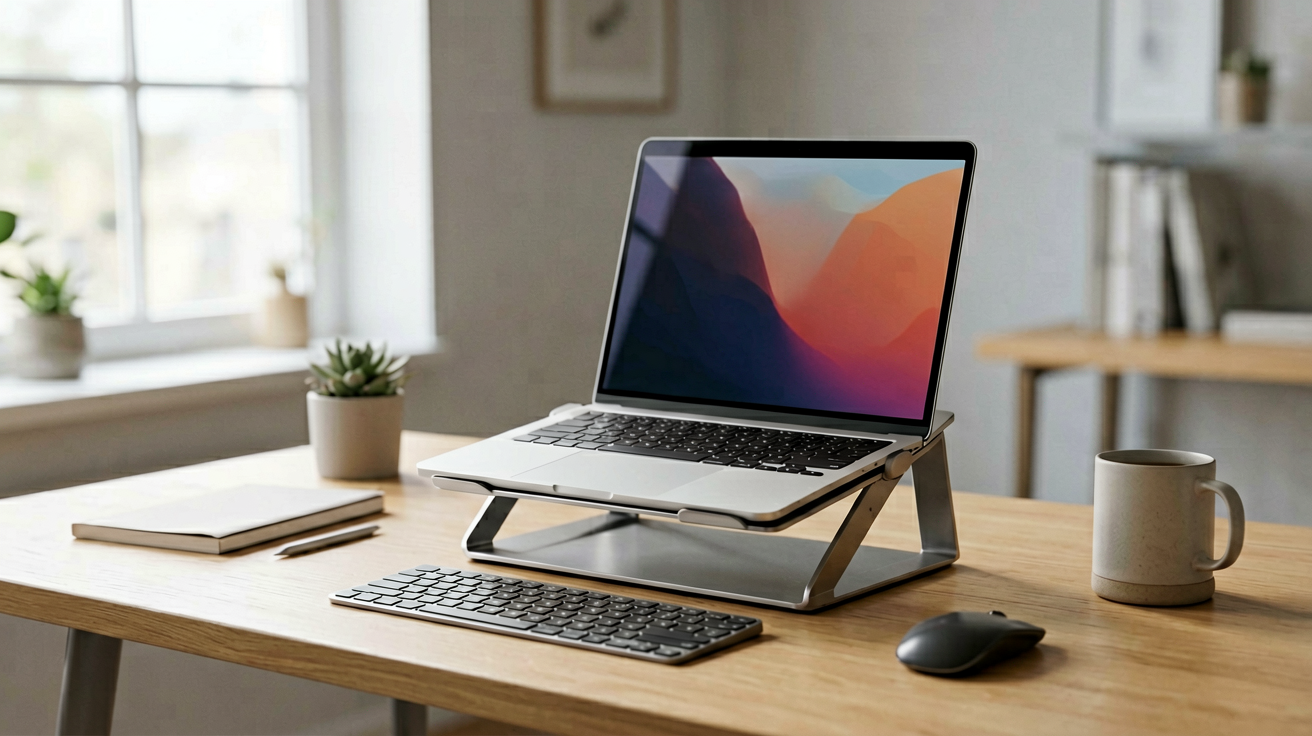
Some remote workers pair a laptop stand with an external keyboard and mouse. This lets you keep the screen at eye level while typing with your hands at a natural desk height. That is the ideal ergonomic setup, but it requires extra desk space and cables. If you do not have room for a full desk upgrade, just raising the laptop screen with a stand is already a significant improvement.
Top Pick: OMOTON Portable Laptop Stand
Who should buy this and why now: you need a simple, affordable laptop stand that raises your screen to a comfortable height and folds flat for storage or travel. At $12.99 with a 4.5 star rating from over 4,000 reviews (as of August 15, 2026), the OMOTON stand is the best value in the budget category.
The OMOTON stand is made from aluminum alloy with a rubber-coated surface that grips the laptop securely. It adjusts to six different height angles, giving you enough range to position most laptop screens at or near eye level when seated at a standard desk. The angles are set by folding the stand into different configurations, not by sliding parts. That means the stand is rigid and does not wobble during typing.
The stand folds completely flat, roughly the size of a paperback book. It weighs about 1.3 pounds, which makes it easy to carry in a laptop bag or backpack. If you work from coffee shops, co-working spaces, or different rooms in your house, the portability is a real advantage. You can set up your ergonomic workspace in under 30 seconds.
Compatibility covers laptops from 10 to 17 inches. That includes MacBook Air, MacBook Pro, Dell XPS 13 and 15, HP Spectre, Lenovo ThinkPad, and most Windows ultrabooks. The stand supports laptops up to 22 pounds, which covers every consumer model on the market. Larger gaming laptops may approach the weight limit, so check your specific model if you are unsure.
Heat dissipation is another benefit. The open design leaves space underneath the laptop for air to flow. Laptops that run warm during video calls or multitasking will stay cooler on this stand than on a flat desk surface. The rubber feet on the base prevent the stand from sliding on smooth desks. The rubber pads on the top cradle keep your laptop from slipping forward.
OMOTON Stand Quick Specs
- Material: Aluminum alloy with rubber coating
- Height adjustments: Six angles
- Compatible sizes: 10 to 17 inch laptops
- Weight capacity: Up to 22 lbs
- Folded size: Approximately 11 x 8.5 x 1 inches
- Weight: 1.3 lbs
- Price: $12.99 on Amazon (as of August 2026)
- Rating: 4.5 stars from 4,000+ reviews
Who It Is Not For
If you need a stand that raises your laptop more than six inches off the desk, the OMOTON may not provide enough height. It is optimized for standard desk use, not for standing desks or tall chairs. If you work at a standing desk, consider a taller riser or a monitor arm instead.
If you want a built-in cooling fan, this stand does not have one. Some higher-priced stands include active cooling with USB-powered fans. The OMOTON relies on passive airflow, which is sufficient for normal use but may not be enough for laptops that run very hot under load.
If you need wireless charging built into the stand, this model does not offer it. Some premium stands include Qi wireless charging pads for phones. The OMOTON is purely a structural support stand with no electronic features.
Alternative: Ugreen Laptop Stand with Adjustable Height
Who should buy this and why now: you want a stand with smoother height adjustment and a slightly more premium feel, and you do not mind paying a bit more. Ugreen makes reliable accessories and this stand reflects that reputation at a higher price point.
The Ugreen stand uses a scissor-like hinge mechanism that lets you adjust the height continuously rather than snapping into fixed angles. This gives you finer control over screen position. You can raise or lower the laptop in small increments until the screen is exactly at eye level. The mechanism is smooth and holds position firmly without sagging over time.
The build is all-metal with a matte finish that resists fingerprints and scratches. The base is wider than the OMOTON, which adds stability for larger laptops. The rubber padding is thicker, which means your laptop sits more securely and vibrations from typing do not travel into the desk surface.
At around $25 to $30, this stand costs roughly double the OMOTON. The extra money buys you continuous adjustability and a more refined build. For most remote workers, the OMOTON is sufficient. But if you adjust your setup multiple times a day or share a desk with someone who has a different chair height, the Ugreen's precision adjustment is worth the upgrade.
How to Position Your Laptop Stand Correctly
Buying a stand is only half the equation. Using it correctly matters just as much for ergonomics. Here is how to set up your laptop stand for maximum comfort.
Place the stand on a stable surface at your normal desk height. Put your laptop on the stand and adjust it to the highest comfortable angle. Your eyes should be level with the top third of the screen when you sit in your normal working posture. If you have to look down to see the content, raise the stand. If you are tilting your head back, lower it slightly.
If you are using an external keyboard and mouse, position them on the desk in front of the stand. Your elbows should bend at about 90 degrees when your hands rest on the keyboard. Your wrists should be straight, not bent up or down. Your shoulders should be relaxed, not shrugged up toward your ears.
Check your screen distance. Your eyes should be about an arm's length from the screen, roughly 20 to 26 inches. If the screen is too close, you will squint and strain. If it is too far, you will lean forward to compensate. Move the stand closer or farther until the distance feels natural.
The 20-20-20 rule applies here too. Every 20 minutes, look at something 20 feet away for 20 seconds. This reduces eye strain from prolonged screen focus. A laptop stand does not prevent eye strain by itself, but it reduces the neck and shoulder strain that often accompanies eye fatigue.
Common Mistakes with Laptop Stands
Even a good stand can cause problems if used incorrectly. Here are the most frequent mistakes and how to avoid them.
Setting the stand too low is the most common error. People place the stand on the desk and assume the laptop is now at the right height. But if the stand only raises the laptop by three or four inches, the screen may still be below eye level. Check your posture in a mirror or take a photo of yourself working. If your chin is jutting forward, the stand is too low.
Using the stand on an unstable surface causes wobbling and potential laptop falls. Card tables, wobbly desks, and uneven surfaces are risky. Always place the stand on a flat, sturdy surface. If your desk has a gap or irregularity, find a different spot or use a coaster or folded cloth to level it.
Ignoring cable management creates clutter and trip hazards. A laptop stand adds another device with its own cable. Route the charging cable along the leg of the stand or under the desk. Use a cable sleeve or zip ties to keep things tidy. Tripping over a loose cable is worse than not having a stand at all.
Assuming the stand will fix all posture problems. A laptop stand addresses neck and shoulder alignment from screen height, but it does not fix your chair, your desk height, or your sitting habits. If your chair is too low or too high, raise or lower it to match. Your feet should rest flat on the floor or on a footrest. Your hips should be slightly higher than your knees when seated.
Maintenance and Care
Laptop stands are simple devices with few moving parts, so maintenance is minimal. A few basic practices will keep yours working well for years.
Wipe the rubber pads periodically with a damp cloth to remove dust and skin oils. Buildup on the rubber reduces grip and can cause your laptop to slip. Clean the aluminum surface with a dry microfiber cloth. Avoid harsh cleaners that could damage the coating.
Check the hinge mechanism every few months. If the stand uses folding angles, make sure the joints move smoothly and lock into place firmly. If they feel loose or wobbly, tighten any visible screws. Most budget stands do not have adjustable tension, so if the hinges are worn, replacement may be the only option.
Store the stand folded when not in use for extended periods. This prevents dust accumulation and protects the rubber pads from prolonged compression. If you leave the stand unfolded for months, the rubber may develop a permanent set and lose some grip.
Final Thoughts
A $12.99 laptop stand solved a chronic neck pain problem that had lasted me months. The OMOTON Portable Laptop Stand is the best value option for remote workers who want simple, effective ergonomic support without spending a lot. The six-angle adjustment covers most desk setups, the fold-flat design makes it portable, and the aluminum construction feels solid enough for daily use.
If you need finer height control or a more premium build, the Ugreen adjustable stand is a worthy upgrade at roughly double the price. Either way, investing in a laptop stand is one of the smallest changes with the biggest impact on your daily comfort.
Prices and availability are subject to change. Confirm the current price on Amazon before purchasing.
We may earn commissions from Amazon and Skimlinks partner merchants (affiliate links, supports the site).
Related Guides
- Best Laptop Accessories Under $30 in 2026
- Best Under-Desk Cable Management for Standing Desk 2026
- Best Lap Desks for WFH in 2026
Internal Picks
- Looking for a ready shortlist? See our Mother's Day Gifts
- Looking for a ready shortlist? See our Father's Day Gifts
ShoppingShare participates in the Amazon Associates Program. We may earn commissions from qualifying purchases at no extra cost to you. Our reviews are based on independent analysis of user reviews and product specifications.
More Reviews & Guides
View all →


Found Something You Like?
All prices on Amazon may change. Check the current deal before it's gone.
More Amazon Deals →